How to install the App logs package and show your errors on an incident
Install the Node.js or Python package so every incident carries what your app logged in that minute.
App logs is optional. One package in your own code, and every incident carries what your application logged in the minute it failed — under Logs around the failure on the incident page.
It is read-only. It explains failures; it never decides whether you are up.
Availability
- Node.js — available now,
@uptime-agent/nodeon npm. - Python — available now,
uptime-agenton PyPI (the import isuptimeagent). - PHP, Go and Java — not ready yet; their tabs are marked soon. Until then those services are monitored from the outside only: you still get confirmed incidents, just without your own error lines attached.
Install it (Node.js)
Open App logs in the sidebar.
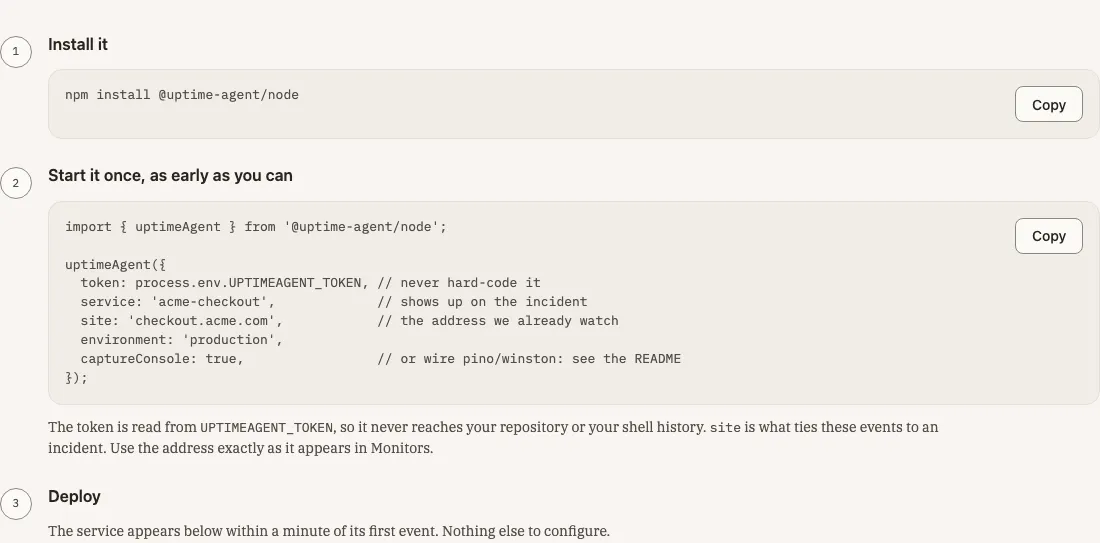
1. Install the package
npm install @uptime-agent/node
2. Start it once, as early as you can
import { uptimeAgent } from '@uptime-agent/node';

uptimeAgent({
  token: process.env.UPTIMEAGENT_TOKEN, // never hard-code it
  service: 'acme-checkout',             // shows up on the incident
  site: 'checkout.acme.com',            // the address we already watch
  environment: 'production',
  captureConsole: true,                 // or wire pino/winston: see the README
});
Put this at the top of your entry point, before your framework boots, so it is running before anything can fail.
- token — your install key, read from the
UPTIMEAGENT_TOKENenvironment variable so it never reaches your repository or your shell history. - service — the name you will see on the incident.
- site — this is what ties these events to an incident. Use the address exactly as it appears in Monitors.
- environment — for example production.
- captureConsole — ships what you already
console.errorandconsole.warn. If you log with pino or winston, leave it out and add the package’s stream to your logger instead; the package README shows both.
3. Deploy
The service appears in Connected services within a minute of its first event. Nothing else to configure.
Install it (Python)
The same three steps. Pick the Python tab on the App logs page to copy them.
1. Install the package
pip install uptime-agent
2. Start it once, as early as you can
import os
import uptimeagent

uptimeagent.uptime_agent(
    token=os.environ.get("UPTIMEAGENT_TOKEN"),  # never hard-code it
    service="acme-checkout",                    # shows up on the incident
    site="checkout.acme.com",                   # the address we already watch
    environment="production",
    capture_logging=True,                       # what the logging module records
)
Put this where your process starts, before your framework or WSGI/ASGI server boots. The options mean the same as in Node.js above; capture_logging=True attaches the package to the standard logging module, so warnings and errors your app already logs are what it ships. structlog and loguru both bridge to stdlib logging, so they are covered too.
3. Deploy
As above: the service appears in Connected services within a minute of its first event.
Confirm it is working
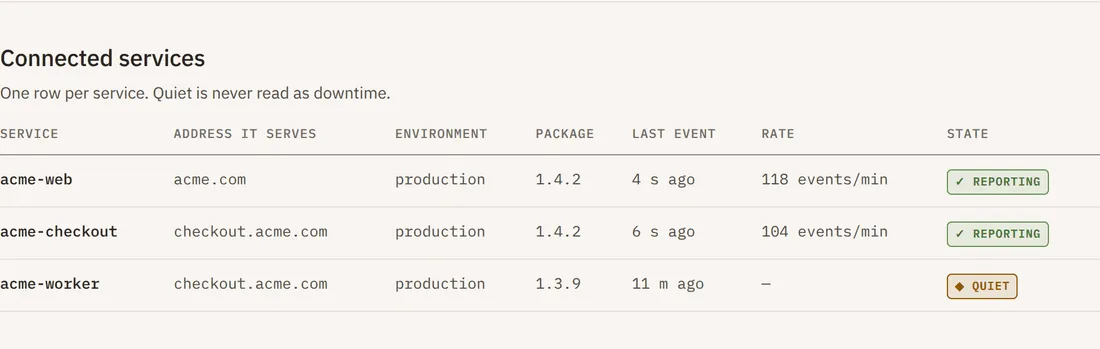
One row per service, showing the address it serves, its environment, the package version, its last event, its rate and its state. Quiet is never read as downtime — a service with nothing to say is not an outage.
Where the logs appear
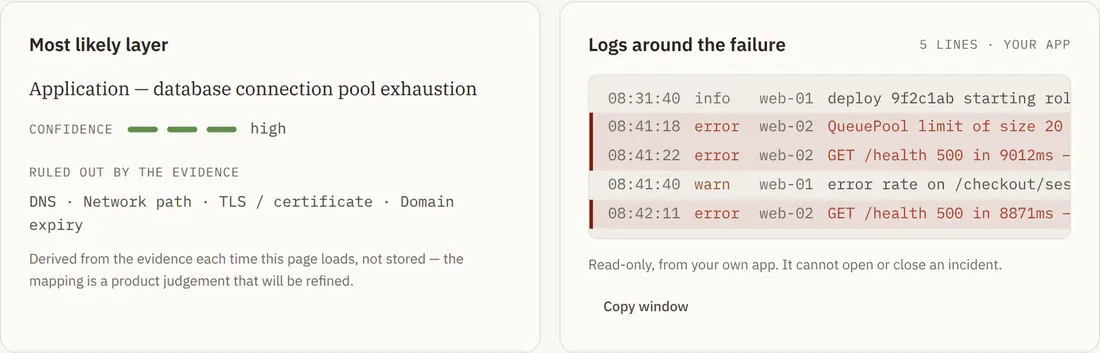
On any incident, the Logs around the failure card sits beside Most likely layer, above the evidence. Error lines are highlighted, warnings dimmed. Copy window copies the whole window for pasting into a ticket or an assistant.
Without the package, that card is a single line offering to set it up.
What it sends, and what it refuses to do
It sends errors your app already logs, with path, status and duration; process restarts and exit codes; and a heartbeat every 30 seconds naming the service, environment, package version and runtime, with the process’s memory use, uptime and open handle or thread count.
It never writes, restarts, deploys or accepts a command; never reads files, environment variables or your database; never votes on whether you are up (the regions decide that); and never sends anything your redaction list matches. Logs are kept only around a confirmed incident.
Redaction
redact: {
  keys: ['password','token','secret','api_key'],
  patterns: [/authorization:\s*bearer\s+\S+/i]
}
In Python the same option takes a dictionary:
redact={
    "keys": ["password", "token", "secret", "api_key"],
    "patterns": [re.compile(r"authorization:\s*bearer\s+\S+", re.I)],
}
Add your own keys and patterns for anything specific to your application.
Troubleshooting
The service never appears. Check UPTIMEAGENT_TOKEN is set in the deployed environment, not just locally, and that the process actually reached the uptimeAgent() or uptime_agent() call.
The service reports, but no logs appear on an incident. The site value does not match a monitored address. It must be identical to the address shown in Monitors.
The row says “quiet”. No events recently. That is normal for a healthy low-traffic service and is never treated as downtime.