How to work an incident from alert to resolved
Acknowledge, read the evidence, hand off to an AI agent, and close it out.
An incident is opened only after the confirmation layer agrees something is really wrong. From there it has one named owner and one page carrying everything known about it.
The lifecycle
Open — confirmed, nobody has taken it. Assigned — somebody owns it. Resolved — closed, with all its evidence kept.
Find the incident
Three ways in:
- The alert itself — the email or Slack message has Acknowledge, Mark as resolved and View incident. Those first two work with one click and no login; ownership updates for everyone instantly.
- My work — everything assigned to you, as a board or a list.
- Incidents — every incident the confirmation layer has ever opened, filterable by status, site and owner.
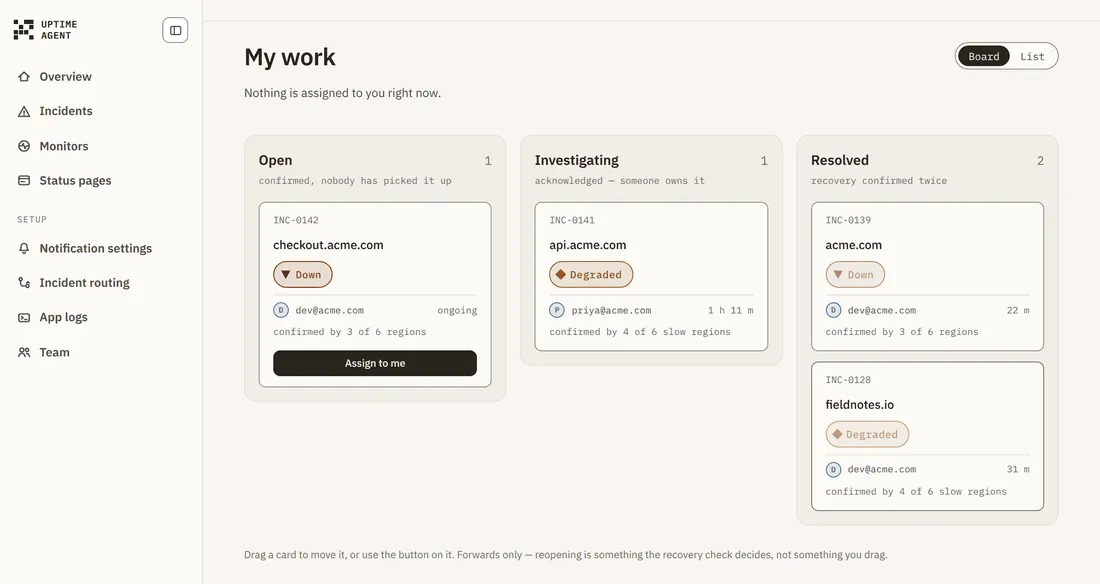
My work also shows what a teammate is handling, so two people do not debug the same thing.
Take it
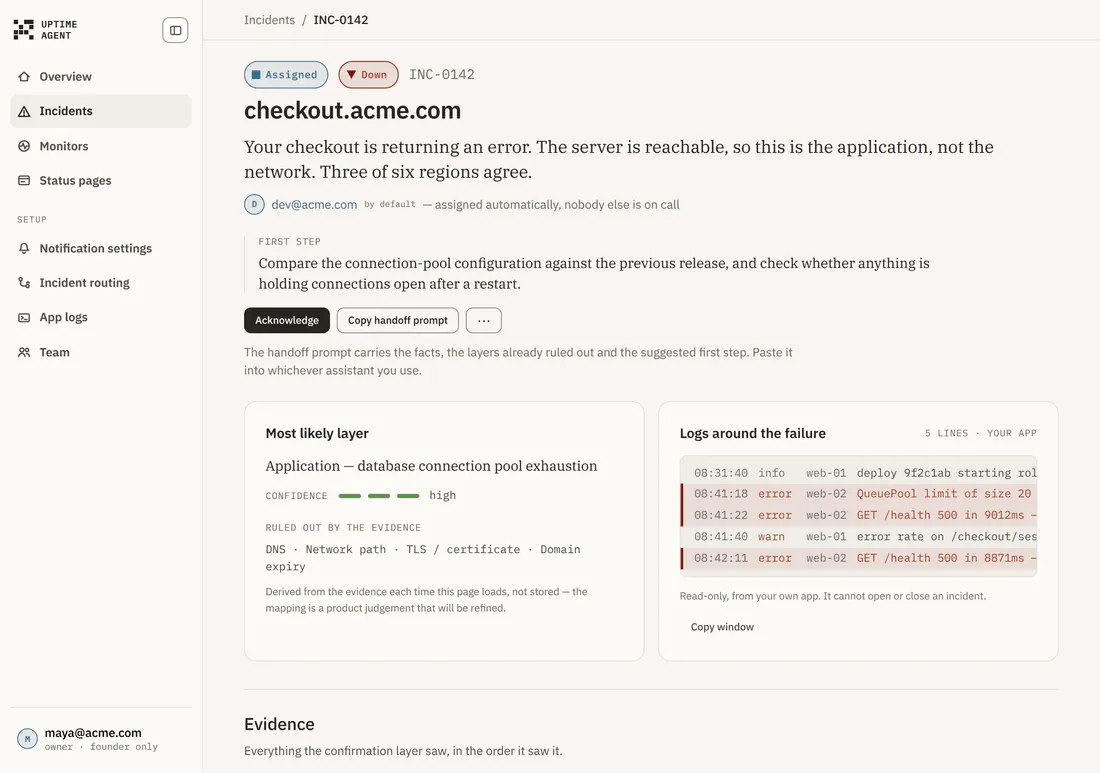
The top of the page answers the question before it asks anything of you: what is wrong in plain language, who owns it, and a suggested first step.
There is one primary button at a time — Acknowledge while it is unowned, then Mark as resolved. Not a real outage sits quietly beside it, and reassigning lives on the Ownership card below, because four equal buttons is four decisions at 3am.
Acknowledging stops the fallback timer.
Read the evidence
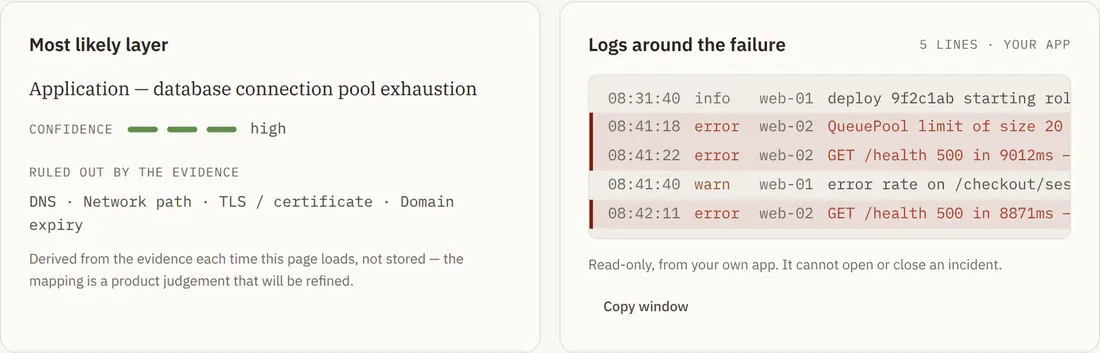
Most likely layer names where the failure probably sits, with a confidence meter and — just as usefully — the layers the evidence has ruled out, so you do not re-check them.
Beside it, Logs around the failure shows what your own application logged in that minute, if you have installed the App logs package.
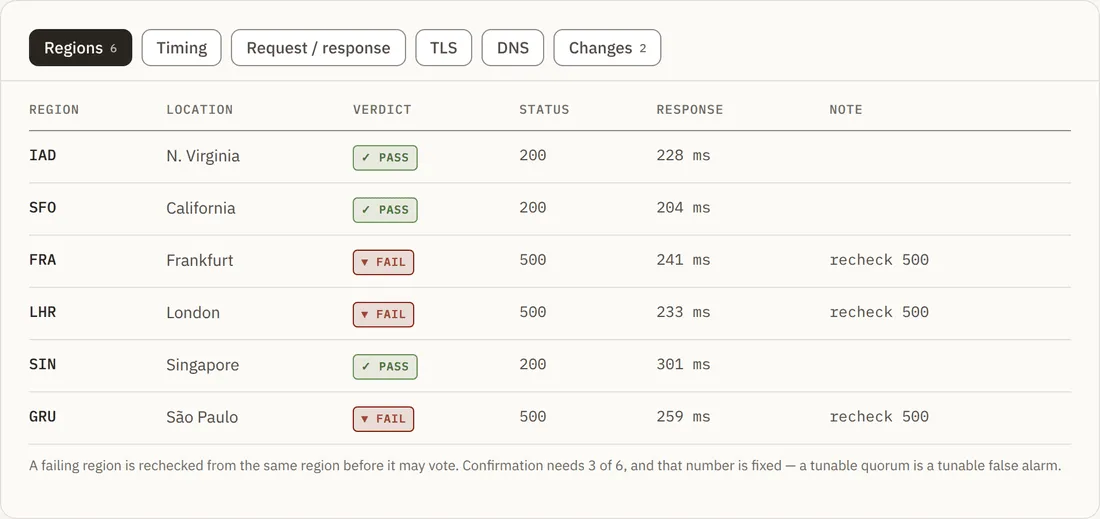
Everything the confirmation layer saw, in the order it saw it. A tab only appears when the checks brought something back for it, so a plain HTTP failure may show four tabs and a certificate failure five:
- Regions — every region’s verdict, status code, response time and note. A failing region rechecks itself before the incident opens.
- Timing — DNS, TCP, TLS, first byte and transfer, compared against this site’s own seven-day median.
- Request / response — exactly what was sent, and what came back from the slowest failing region.
- TLS — the certificate chain and its metadata, when a chain was captured.
- DNS — every record, with whether it agreed across regions. If a record changed near the failure window, the change is noted here. That is correlation, not cause — nothing is presented as the reason. That call is yours.
Hand it to an AI agent
Choose Copy prompt and paste it into whichever assistant you use. It carries the facts, the layers already ruled out so the agent does not re-derive them, the suggested first step, and a closing instruction to mark the incident resolved once the fix is verified.
Close it
Choose Mark as resolved. Recovery is verified independently by the regions, and the closure notice goes out on the same thread as the alert.
If the incident was not real, choose Not a real outage beside it. A small form asks What made it a false alarm? — the note is required, and Record it refuses an empty one, because that is what makes the report useful. It is stored on the incident and feeds the confirmation logic, because a false positive nobody explains gets repeated. No recovery check is queued: there is nothing to verify recovering from.
Export
The Incidents page has Export CSV and Export JSON, carrying id, target, signal, status, owner, quorum, start, duration and likely layer.
Troubleshooting
“Already assigned to…” when I try to take it. Somebody claimed it first. Use Reassign if it should be yours.
The Regions tab says “No probe snapshot”. Per-region evidence is captured at confirmation, and this incident has none stored.
I cannot post an update. Posting needs the Owner or DevOps role; owning the incident does not grant it.